
1. What is Seamless Product Switching?
When Seamless Product Switching is enabled, selecting a product option (for example, size, color, or linked variant) will:
- Update the product content dynamically
- Replace specific sections on the page
- Update the browser URL
- Avoid a full page reload
This creates a faster and smoother browsing experience similar to a single-page application (SPA).
2. How to Use This Feature
Step 1: Enable Seamless Product Switching
In the app settings, enable:
✅ Enable seamless product switching
By default, only the section that contains product options will be updated.
Step 2: Add Additional Section IDs (Optional)
Some parts of the product page may also need to be refreshed when the product changes, such as:
- Product recommendations
- Product details
- Reviews
- Custom theme sections
You can specify additional section IDs to be re-rendered.
Example:
shopify-section-template--22688037077300__product-recommendations
You may add multiple section IDs, one per entry.
3. How to Get a Section ID
Method 1: Shopify Theme Editor (Recommended)
- Go to Online Store → Themes
- Click Customize
- Navigate to a product page
- Click the section you want to update
- Look at the URL or browser inspector — the section ID usually starts with:
shopify-section-template--
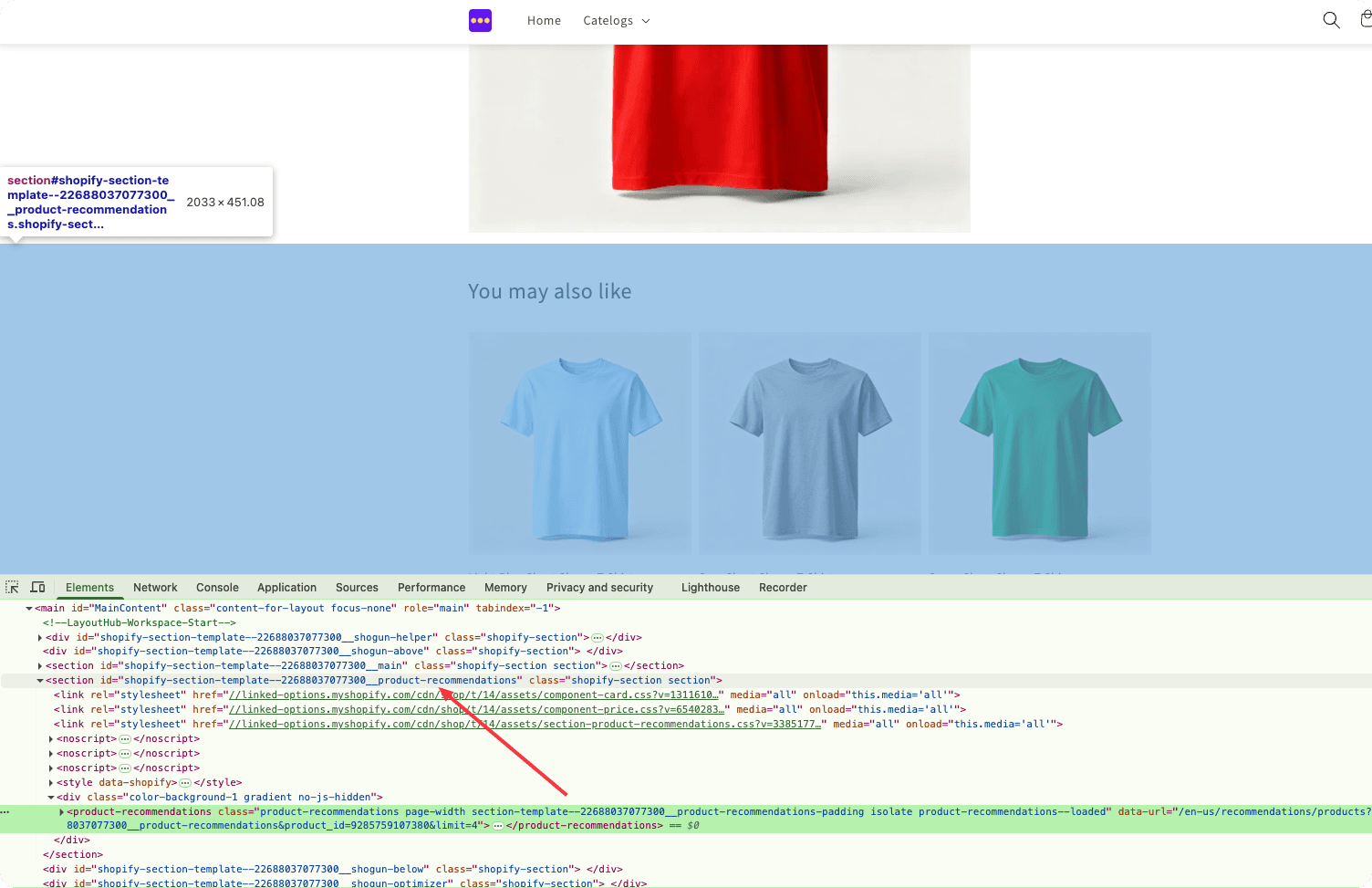
Method 2: Browser Developer Tools
- Open the product page
- Right-click the section → Inspect
- Locate the outer container element
- Find the
idattribute, for example:
<div id="shopify-section-template--123456789__details">
👉 Copy the full ID value.
4. Third-Party App Compatibility (Important)
Why Some Apps Stop Working
Many third-party Shopify apps:
- Initialize JavaScript only once on page load
- Expect a full page refresh
- Bind event listeners when the DOM first loads
Because Seamless Product Switching replaces parts of the page dynamically, those apps may:
- Stop responding
- Display outdated content
- Fail to initialize on the new product
⚠️ This is expected behavior for apps that are not SPA-aware.
5. How to Fix Compatibility Issues
Our Solution: Product Switch Event
We provide a custom JavaScript event that fires every time a seamless product switch completes.
Developers can listen to this event and re-initialize:
- Third-party apps
- Theme scripts
- Custom UI logic
Event Name
king-linked-options:product-seamless-switched
Example Usage
document.addEventListener(
  'king-linked-options:product-seamless-switched',
  function (event) {
    // Reinitialize third-party apps
    // Rebind theme JavaScript
    // Refresh widgets or UI components
  }
);
6. Working with Third-Party App Developers
If a third-party app stops working after product switching:
- Identify which app is affected
- Contact the app developer
- Ask if they provide:
- A JavaScript re-initialization function
- A public API or global method
Example (hypothetical)
document.addEventListener(
  'king-linked-options:product-seamless-switched',
  function () {
    if (window.ReviewApp && typeof window.ReviewApp.init === 'function') {
      window.ReviewApp.init();
    }
  }
);
📌 Most modern apps already support this pattern.
7. Best Practices
- ✅ Add only necessary section IDs (avoid re-rendering the entire page)
- ✅ Reinitialize scripts on the provided event
8. When to Disable Seamless Switching
You may consider disabling this feature if:
- A critical third-party app does not support re-initialization
- The app vendor confirms incompatibility
- A full page reload is required for business-critical logic
9. Summary
- Seamless Product Switching improves UX by avoiding reloads
- Section IDs control what gets updated
- Some third-party apps require manual re-initialization
- We provide a dedicated event to handle compatibility cleanly
If you have questions or need help integrating a specific app, please contact our support team.