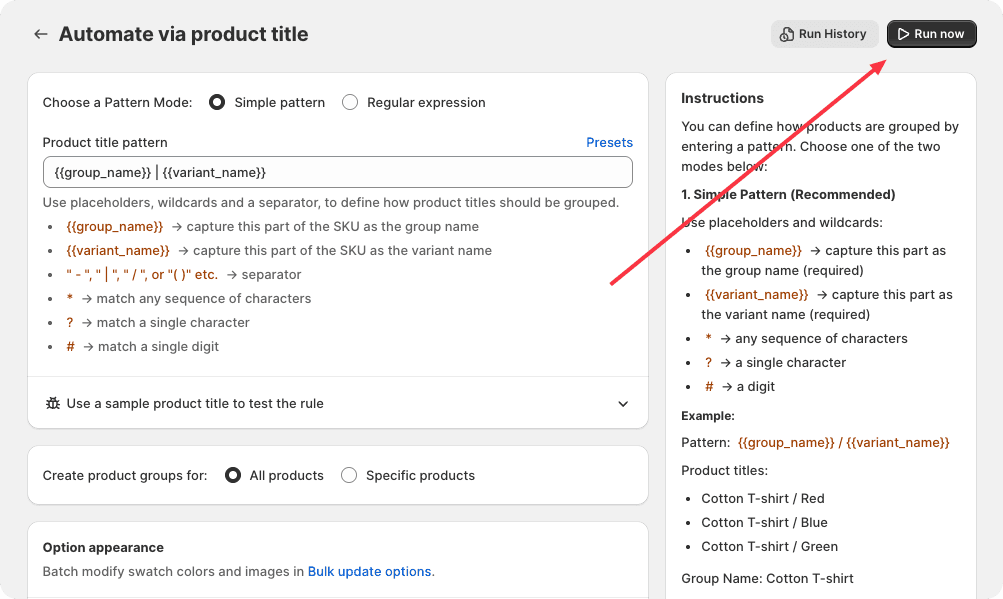
Automated rules are designed to automatically group products by identifying patterns in product attributes or by collection membership. These rules detect products that share the same pattern or belong to the same collection and add them to a common product group, enabling consistent and efficient product organization.
Rule Execution Logic
1. Pattern-Based Rules
Pattern-based rules operate by examining key product attributes such as:
- Product Title
- SKU
- Product Tags
The system searches for products that match a specific pattern across these attributes. Products sharing the same pattern are then grouped together into a Product Group, and a new group is automatically created if one does not exist.
Example Workflow:
- Identify the pattern in product titles, SKUs, or tags.
- Search the catalog for all products matching this pattern.
- Add matched products to a new or existing product group.
- Ensure the product group is labeled and organized according to the pattern.
2. Collection-Based Rules
Collection-based rules focus on product collections. All products within the same collection are grouped together into a single Product Group. This method simplifies management when products are logically associated within a collection.
Example Workflow:
- Identify all products within a specified collection.
- Add these products to a dedicated product group.
- Create the product group if it does not already exist.
- Maintain consistent grouping as new products are added to the collection.
For more detailed rule configurations, please refer to:
How to Run a Rule
After you configure and save a bundle rule, click the Run now button. The app will then automatically create product groups based on the rule you have defined.