
Our Product Groups API enables seamless integration with your existing systems, making it easier than ever to create, update, delete, and retrieve product groups. With its simple and secure design, the API helps you automate workflows, maintain consistent data across platforms, and streamline your overall product management process.
Support
For technical support or questions about the API, contact us at: [email protected]
Authentication
The API uses Shop Domain and API Key to authenticate requests. They can be found in Settings > Manage product groups by API:
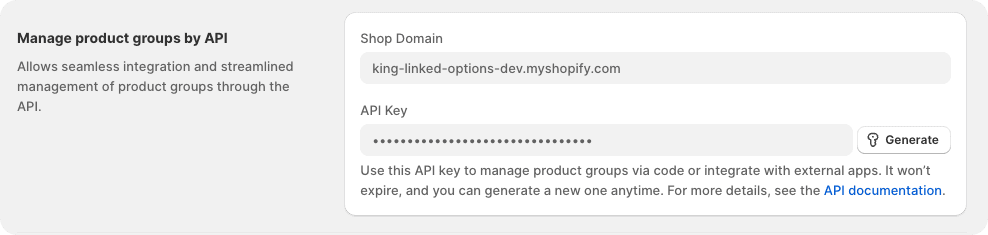
All API requests require the following header for authentication:
{
	"Content-Type": "application/json",
	"X-SHOP-DOMAIN": "Your domain, xxx.myshopify",
    "X-API-KEY": "YOUR_API_KEY"
}
Authenticated request:
curl -i -H "X-SHOP-DOMAIN: $SHOP_DOMAIN" \
  -H "X-API-KEY: $API_KEY" \
  "https://api.linkedoption.com/v1/groups
Base URL
https://api.linkedoption.com/v1
Endpoints
1. List all groups
Returns a paginated list of groups.
Endpoint: GET /v1/groups
Query Parameters:
- page (integer, optional, default:1): Page number for pagination.
- page_size (integer, optional, default: 10, max_value: 100): Number of items per page.
Example Request:
curl -i -H "X-SHOP-DOMAIN: $SHOP_DOMAIN" \
  -H "X-API-KEY: $API_KEY" \
  "https://api.linkedoption.com/v1/groups?page=1&page_size=10"
2. Get Product Group by ID
Retrieve a single product group by its group ID.
Endpoint: GET /v1/groups/:id
URL Parameters:
id(string, required): The group ID of the product group (e.g.,100).
Example Request:
curl -i -H "X-SHOP-DOMAIN: $SHOP_DOMAIN" \
  -H "X-API-KEY: $API_KEY" \
  "https://api.linkedoption.com/v1/groups/100"
3. Create a single option group
Create a single option group with specified products. Returns the created group ID.
Endpoint: POST /v1/groups/single
Body (JSON):
- group_name (string, required): The name of the group, used internally.
- status (string, optional): The status of the group. Defaults to
ACTIVE. - Available values:
ACTIVE,DRAFT.
- Available values:
- option_name (string, required): The name of the option.
- template_id (integer, required): The template for the product group.
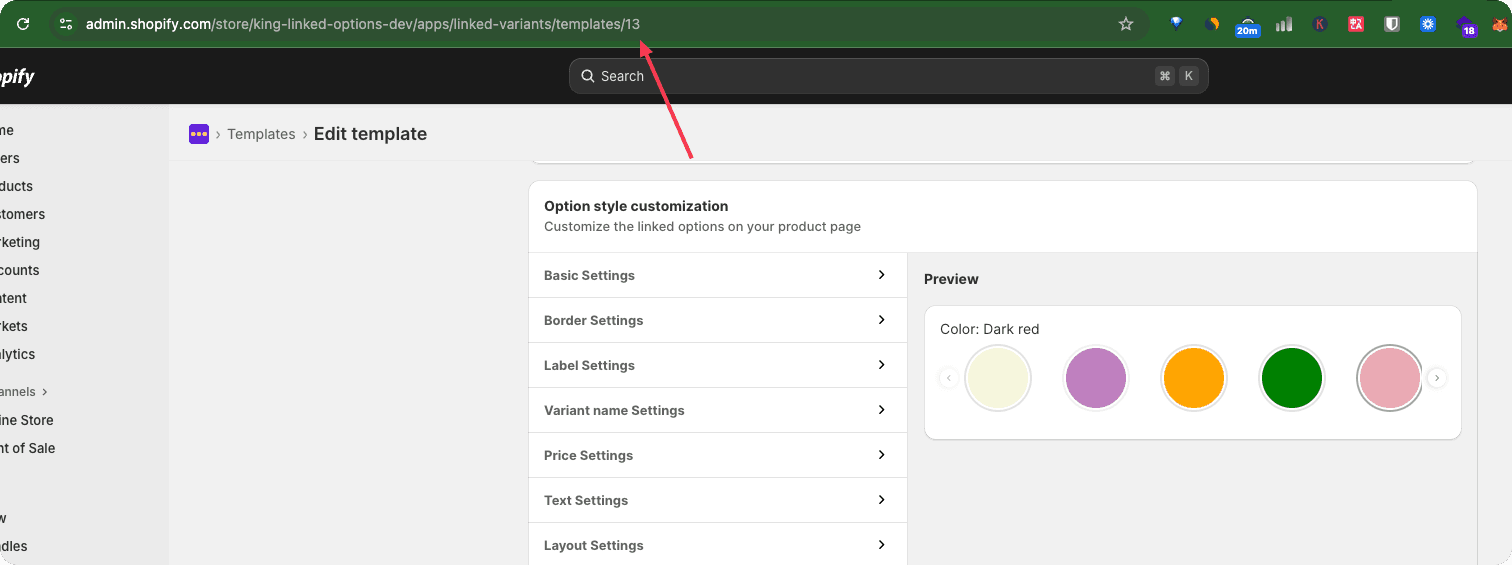
- card_selector_type (string, required, default: DEFAULT): Defines the option display style on the product card. Allowed values:
- DEFAULT: The product card option type follows the template’s option type.
For example, if the template uses a color-swatch type, the product card will also display it as a color swatch. - IMAGE_SWATCH: Render the option as an image swatch on the product card.
- COLOR_SWATCH: Render the option as a color swatch on the product card.
- BUTTON: Render the option as a button on the product card.
- DROPDOWN: Render the option as a dropdown menu on the product card.
- DEFAULT: The product card option type follows the template’s option type.
- hide_in_card (boolean, optional): Whether to hide this option on the product card.
- products (array, required): A list of product configurations.
- id (string, required): Shopify product ID - a numeric string like "14824372961343". You can find this ID in your Shopify admin URL when viewing a product: https://admin.shopify.com/store/your-store-name/products/14824372961343
- option_value (object, required): Configuration for the option value.
- value (string, required): The option value for the product.
- color_type (string, optional): The color type for color swatches. Required when using a color swatch template. Allowed values:
- one_color: A single solid color.
- two_color: A two-color split swatch.
- custom_image: A custom image used to represent complex colors or patterns.
- color_one (string, optional): A valid color value (e.g.,
#FFFFFF). Required when color_type is one_color or two_color. - color_two (string, optional): A valid color value (e.g.,
#F1F1F1). Required when color_type is two_color. - color_image (string, optional): A valid public image URL used only when color_type is custom_image.
This image replaces a color swatch and is typically used to represent complex colors or patterns. - image (string, optional): A publicly accessible image URL used when the option is displayed as an image swatch. If omitted, the system will automatically use the product’s first image as the default swatch image.
- badge (string, optional): A badge label for the option value (e.g., “10 off”, “Sale”).
Example body:
{
  "group_name": "Baby Socks",
  "status": "ACTIVE",
  "option_name": "Style",
  "template_id": "3",
  "card_selector_type": "DEFAULT",
  "hide_in_card": true,
  "products": [
    {
      "id": "8224593641628",
      "option_value": {
        "value": "Deer",
        "color_type": "one_color",
        "color_one": "#e66565",
        "color_two": "",
        "color_image": "",
        "image": "https://thumbnail.getalltool.com/lo/king-linked-options-dev.myshopify.com/b3ad478e483865844be93a7d7b925d12.jpg",
        "badge": "20%"
      }
    },
    {
      "id": "8224594591900",
      "option_value": {
        "value": "Eagle",
        "color_type": "one_color",
        "color_one": "#b4b4b4",
        "color_two": "",
        "color_image": "",
        "image": "https://thumbnail.getalltool.com/lo/king-linked-options-dev.myshopify.com/e75a3a8eaef01c8978072cb39f60c1f1.jpg",
        "badge": ""
      }
    },
    {
      "id": "8224593576092",
      "option_value": {
        "value": "Fox",
        "color_type": "one_color",
        "color_one": "#72d433",
        "color_two": "",
        "color_image": "",
        "image": "https://thumbnail.getalltool.com/lo/king-linked-options-dev.myshopify.com/3655f419c39afa28d1cf39c9589d231c.jpg",
        "badge": ""
      }
    }
  ]
}
Example request:
curl -i -H "X-SHOP-DOMAIN: $SHOP_DOMAIN" \
  -H "X-API-KEY: $API_KEY" \
  -H "Content-Type: application/json" \
  -d '{"group_name":"Baby Socks","status":"ACTIVE","option_name":"Style","template_id":"3","card_selector_type":"DEFAULT","hide_in_card":true,"products":[{"id":"8224593641628","option_value":{"value":"Deer","color_type":"one_color","color_one":"#e66565","color_two":"","color_image":"","image":"https://thumbnail.getalltool.com/lo/king-linked-options-dev.myshopify.com/b3ad478e483865844be93a7d7b925d12.jpg","badge":"20%"}},{"id":"8224594591900","option_value":{"value":"Eagle","color_type":"one_color","color_one":"#b4b4b4","color_two":"","color_image":"","image":"https://thumbnail.getalltool.com/lo/king-linked-options-dev.myshopify.com/e75a3a8eaef01c8978072cb39f60c1f1.jpg","badge":""}},{"id":"8224593576092","option_value":{"value":"Fox","color_type":"one_color","color_one":"#72d433","color_two":"","color_image":"","image":"https://thumbnail.getalltool.com/lo/king-linked-options-dev.myshopify.com/3655f419c39afa28d1cf39c9589d231c.jpg","badge":""}}]}' \
  -X POST "https://api.linkedoption.com/v1/groups/single"
4. Update a single option group
Create a single option group with specified products. Returns the created group ID.
Endpoint: PUT /v1/groups/single/:id
URL Parameters:
id(string, required): The group ID of the product group (e.g.,100).
Body (JSON):
The body structure is consistent with the endpoint for creating a single-option product group.
Example request:
curl -i -H "X-SHOP-DOMAIN: $SHOP_DOMAIN" \
  -H "X-API-KEY: $API_KEY" \
  -H "Content-Type: application/json" \
  -d '{"group_name":"Baby Socks","status":"ACTIVE","option_name":"Style","template_id":"3","card_selector_type":"DEFAULT","hide_in_card":true,"products":[{"id":"8224593641628","option_value":{"value":"Deer","color_type":"one_color","color_one":"#e66565","color_two":"","color_image":"","image":"https://thumbnail.getalltool.com/lo/king-linked-options-dev.myshopify.com/b3ad478e483865844be93a7d7b925d12.jpg","badge":"20%"}},{"id":"8224594591900","option_value":{"value":"Eagle","color_type":"one_color","color_one":"#b4b4b4","color_two":"","color_image":"","image":"https://thumbnail.getalltool.com/lo/king-linked-options-dev.myshopify.com/e75a3a8eaef01c8978072cb39f60c1f1.jpg","badge":""}},{"id":"8224593576092","option_value":{"value":"Fox","color_type":"one_color","color_one":"#72d433","color_two":"","color_image":"","image":"https://thumbnail.getalltool.com/lo/king-linked-options-dev.myshopify.com/3655f419c39afa28d1cf39c9589d231c.jpg","badge":""}}]}' \
  -X PUT https://api.linkedoption.com/v1/groups/single/100
5. Create a multi-option group
Create a single option group with specified products. Returns the created group ID.
Endpoint: POST /v1/groups/multi
Body (JSON):
- group_name (string, required): The name of the group, used internally.
- status (string, optional): The status of the group. Defaults to
ACTIVE. - Available values:
ACTIVE,DRAFT.
- Available values:
- hide_in_card (boolean, optional): Whether to hide this option on the product card.
- options (array, required): Option list
- name (string, required): Option name or label
- template_id (integer, required): The template for the option
- card_selector_type (string, required, default: DEFAULT): Defines the option display style on the product card. Allowed values:
- DEFAULT: The product card option type follows the template’s option type.
For example, if the template uses a color-swatch type, the product card will also display it as a color swatch. - IMAGE_SWATCH: Render the option as an image swatch on the product card.
- COLOR_SWATCH: Render the option as a color swatch on the product card.
- BUTTON: Render the option as a button on the product card.
- DROPDOWN: Render the option as a dropdown menu on the product card.
- DEFAULT: The product card option type follows the template’s option type.
- values (array, required): Option values
- value (string, required): The option value for the product.
- color_type (string, optional): The color type for color swatches. Required when using a color swatch template. Allowed values:
- one_color: A single solid color.
- two_color: A two-color split swatch.
- custom_image: A custom image used to represent complex colors or patterns.
- color_one (string, optional): A valid color value (e.g.,
#FFFFFF). Required when color_type is one_color or two_color. - color_two (string, optional): A valid color value (e.g.,
#F1F1F1). Required when color_type is two_color. - color_image (string, optional): A valid public image URL used only when color_type is custom_image.
This image replaces a color swatch and is typically used to represent complex colors or patterns. - image (string, optional): A publicly accessible image URL used when the option is displayed as an image swatch. If omitted, the system will automatically use the product’s first image as the default swatch image.
- badge (string, optional): A badge label for the option value (e.g., “10 off”, “Sale”).
- products (array, required): A list of product configurations.
- id (string, required): Shopify product ID - a numeric string like "14824372961343". You can find this ID in your Shopify admin URL when viewing a product: https://admin.shopify.com/store/your-store-name/products/14824372961343
- variant (array, required): Option value combinations, e.g., ["Red", "M"].
Example body:
{
  "group_name": "Kids Socks",
  "hide_in_card": false,
  "status": "ACTIVE",
  "options": [
    {
      "name": "Style",
      "template_id": "3",
      "card_selector_type": "DEFAULT",
      "values": [
        {
          "value": "Lace",
          "color_type": "one_color",
          "color_one": "#b53e3e",
          "color_two": "#1c5fd8",
          "color_image": "",
          "image": "https://thumbnail.getalltool.com/lo/king-linked-options-dev.myshopify.com/adb9c45aba74d0d00eaf454fbb35831c.jpg",
          "badge": ""
        },
        {
          "value": "Fashion Letter",
          "color_type": "one_color",
          "color_one": "#b53e3e",
          "color_two": "#1c5fd8",
          "color_image": "",
          "image": "https://thumbnail.getalltool.com/lo/king-linked-options-dev.myshopify.com/2529b7127623e9311723b401aa324856.jpg",
          "badge": ""
        },
        {
          "value": "Mixed",
          "color_type": "one_color",
          "color_one": "#b53e3e",
          "color_two": "#1c5fd8",
          "color_image": "",
          "image": "https://thumbnail.getalltool.com/lo/king-linked-options-dev.myshopify.com/cd011d7102d9ff36518b857e1c77bc16.jpg",
          "badge": ""
        }
      ]
    },
    {
      "name": "Color",
      "template_id": "8",
      "card_selector_type": "DEFAULT",
      "values": [
        {
          "value": "Yellow",
          "color_type": "one_color",
          "color_one": "#ecff00",
          "color_two": "#1c5fd8",
          "image": "",
          "badge": ""
        },
        {
          "value": "Blue",
          "color_type": "two_color",
          "color_one": "#0076ff",
          "color_two": "red",
          "color_image": "",
          "image": "",
          "badge": ""
        },
        {
          "value": "Mixed",
          "color_type": "custom_image",
          "color_one": "#b53e3e",
          "color_two": "#1c5fd8",
          "color_image": "https://thumbnail.getalltool.com/lo/king-linked-options-dev.myshopify.com/3beefc6f5fafb489d0379f0063eb39d0.webp",
          "image": "",
          "badge": ""
        }
      ]
    },
    {
      "name": "Size",
      "template_id": "7",
      "card_selector_type": "DEFAULT",
      "values": [
        {
          "value": "S",
          "color_type": "one_color",
          "color_one": "#b53e3e",
          "color_two": "#1c5fd8",
          "color_image": "",
          "image": "",
          "badge": ""
        },
        {
          "value": "M",
          "color_type": "one_color",
          "color_one": "#b53e3e",
          "color_two": "#1c5fd8",
          "color_image": "",
          "image": "",
          "badge": ""
        },
        {
          "value": "L",
          "color_type": "one_color",
          "color_one": "#b53e3e",
          "color_two": "#1c5fd8",
          "color_image": "",
          "image": "",
          "badge": ""
        }
      ]
    }
  ],
  "products": [
    {
      "id": "8224677068956",
      "variant": [
        "Lace",
        "Yellow",
        "M"
      ]
    },
    {
      "id": "8224592953500",
      "variant": [
        "Fashion Letter",
        "Blue",
        "L"
      ]
    },
    {
      "id": "8224592887964",
      "variant": [
        "Fashion Letter",
        "Blue",
        "M"
      ]
    },
    {
      "id": "8224678051996",
      "variant": [
        "Fashion Letter",
        "Blue",
        "S"
      ]
    },
    {
      "id": "8224592593052",
      "variant": [
        "Fashion Letter",
        "Yellow",
        "L"
      ]
    },
    {
      "id": "8224593084572",
      "variant": [
        "Fashion Letter",
        "Yellow",
        "M"
      ]
    },
    {
      "id": "8224678412444",
      "variant": [
        "Fashion Letter",
        "Yellow",
        "S"
      ]
    },
    {
      "id": "8224591577244",
      "variant": [
        "Lace",
        "Blue",
        "L"
      ]
    },
    {
      "id": "8224591478940",
      "variant": [
        "Lace",
        "Blue",
        "M"
      ]
    },
    {
      "id": "8224591413404",
      "variant": [
        "Lace",
        "Blue",
        "S"
      ]
    },
    {
      "id": "8224591610012",
      "variant": [
        "Lace",
        "Yellow",
        "L"
      ]
    },
    {
      "id": "8224677167260",
      "variant": [
        "Lace",
        "Yellow",
        "S"
      ]
    },
    {
      "id": "8224677626012",
      "variant": [
        "Mixed",
        "Yellow",
        "S"
      ]
    }
  ]
}
Example request:
curl -i -H "X-SHOP-DOMAIN: $SHOP_DOMAIN" \
  -H "X-API-KEY: $API_KEY" \
  -H "Content-Type: application/json" \
  -d '{"group_name":"Kids Socks","hide_in_card":false,"status":"ACTIVE","options":[{"name":"Style","template_id":"3","card_selector_type":"DEFAULT","values":[{"value":"Lace","color_type":"one_color","color_one":"#b53e3e","color_two":"#1c5fd8","color_image":"","image":"https://thumbnail.getalltool.com/lo/king-linked-options-dev.myshopify.com/adb9c45aba74d0d00eaf454fbb35831c.jpg","badge":""},{"value":"Fashion Letter","color_type":"one_color","color_one":"#b53e3e","color_two":"#1c5fd8","color_image":"","image":"https://thumbnail.getalltool.com/lo/king-linked-options-dev.myshopify.com/2529b7127623e9311723b401aa324856.jpg","badge":""},{"value":"Mixed","color_type":"one_color","color_one":"#b53e3e","color_two":"#1c5fd8","color_image":"","image":"https://thumbnail.getalltool.com/lo/king-linked-options-dev.myshopify.com/cd011d7102d9ff36518b857e1c77bc16.jpg","badge":""}]},{"name":"Color","template_id":"8","card_selector_type":"DEFAULT","values":[{"value":"Yellow","color_type":"one_color","color_one":"#ecff00","color_two":"#1c5fd8","image":"","badge":""},{"value":"Blue","color_type":"two_color","color_one":"#0076ff","color_two":"red","color_image":"","image":"","badge":""},{"value":"Mixed","color_type":"custom_image","color_one":"#b53e3e","color_two":"#1c5fd8","color_image":"https://thumbnail.getalltool.com/lo/king-linked-options-dev.myshopify.com/3beefc6f5fafb489d0379f0063eb39d0.webp","image":"","badge":""}]},{"name":"Size","template_id":"7","card_selector_type":"DEFAULT","values":[{"value":"S","color_type":"one_color","color_one":"#b53e3e","color_two":"#1c5fd8","color_image":"","image":"","badge":""},{"value":"M","color_type":"one_color","color_one":"#b53e3e","color_two":"#1c5fd8","color_image":"","image":"","badge":""},{"value":"L","color_type":"one_color","color_one":"#b53e3e","color_two":"#1c5fd8","color_image":"","image":"","badge":""}]}],"products":[{"id":"8224677068956","variant":["Lace","Yellow","M"]},{"id":"8224592953500","variant":["Fashion Letter","Blue","L"]},{"id":"8224592887964","variant":["Fashion Letter","Blue","M"]},{"id":"8224678051996","variant":["Fashion Letter","Blue","S"]},{"id":"8224592593052","variant":["Fashion Letter","Yellow","L"]},{"id":"8224593084572","variant":["Fashion Letter","Yellow","M"]},{"id":"8224678412444","variant":["Fashion Letter","Yellow","S"]},{"id":"8224591577244","variant":["Lace","Blue","L"]},{"id":"8224591478940","variant":["Lace","Blue","M"]},{"id":"8224591413404","variant":["Lace","Blue","S"]},{"id":"8224591610012","variant":["Lace","Yellow","L"]},{"id":"8224677167260","variant":["Lace","Yellow","S"]},{"id":"8224677626012","variant":["Mixed","Yellow","S"]}]}' \
  -X POST https://api.linkedoption.com/v1/groups/multi
6. Update a multi-option group
Create a single option group with specified products. Returns the created group ID.
Endpoint: PUT /v1/groups/multi/:id
URL Parameters:
id(string, required): The group ID of the product group (e.g.,100).
Body (JSON):
The body structure is consistent with the endpoint for creating a multi-option product group.
Example request:
curl -i -H "X-SHOP-DOMAIN: $SHOP_DOMAIN" \
  -H "X-API-KEY: $API_KEY" \
  -H "Content-Type: application/json" \
  -d '{"group_name":"Kids Socks","hide_in_card":false,"status":"ACTIVE","options":[{"name":"Style","template_id":"3","card_selector_type":"DEFAULT","values":[{"value":"Lace","color_type":"one_color","color_one":"#b53e3e","color_two":"#1c5fd8","color_image":"","image":"https://thumbnail.getalltool.com/lo/king-linked-options-dev.myshopify.com/adb9c45aba74d0d00eaf454fbb35831c.jpg","badge":""},{"value":"Fashion Letter","color_type":"one_color","color_one":"#b53e3e","color_two":"#1c5fd8","color_image":"","image":"https://thumbnail.getalltool.com/lo/king-linked-options-dev.myshopify.com/2529b7127623e9311723b401aa324856.jpg","badge":""},{"value":"Mixed","color_type":"one_color","color_one":"#b53e3e","color_two":"#1c5fd8","color_image":"","image":"https://thumbnail.getalltool.com/lo/king-linked-options-dev.myshopify.com/cd011d7102d9ff36518b857e1c77bc16.jpg","badge":""}]},{"name":"Color","template_id":"8","card_selector_type":"DEFAULT","values":[{"value":"Yellow","color_type":"one_color","color_one":"#ecff00","color_two":"#1c5fd8","image":"","badge":""},{"value":"Blue","color_type":"two_color","color_one":"#0076ff","color_two":"red","color_image":"","image":"","badge":""},{"value":"Mixed","color_type":"custom_image","color_one":"#b53e3e","color_two":"#1c5fd8","color_image":"https://thumbnail.getalltool.com/lo/king-linked-options-dev.myshopify.com/3beefc6f5fafb489d0379f0063eb39d0.webp","image":"","badge":""}]},{"name":"Size","template_id":"7","card_selector_type":"DEFAULT","values":[{"value":"S","color_type":"one_color","color_one":"#b53e3e","color_two":"#1c5fd8","color_image":"","image":"","badge":""},{"value":"M","color_type":"one_color","color_one":"#b53e3e","color_two":"#1c5fd8","color_image":"","image":"","badge":""},{"value":"L","color_type":"one_color","color_one":"#b53e3e","color_two":"#1c5fd8","color_image":"","image":"","badge":""}]}],"products":[{"id":"8224677068956","variant":["Lace","Yellow","M"]},{"id":"8224592953500","variant":["Fashion Letter","Blue","L"]},{"id":"8224592887964","variant":["Fashion Letter","Blue","M"]},{"id":"8224678051996","variant":["Fashion Letter","Blue","S"]},{"id":"8224592593052","variant":["Fashion Letter","Yellow","L"]},{"id":"8224593084572","variant":["Fashion Letter","Yellow","M"]},{"id":"8224678412444","variant":["Fashion Letter","Yellow","S"]},{"id":"8224591577244","variant":["Lace","Blue","L"]},{"id":"8224591478940","variant":["Lace","Blue","M"]},{"id":"8224591413404","variant":["Lace","Blue","S"]},{"id":"8224591610012","variant":["Lace","Yellow","L"]},{"id":"8224677167260","variant":["Lace","Yellow","S"]},{"id":"8224677626012","variant":["Mixed","Yellow","S"]}]}' \
  -X PUT https://api.linkedoption.com/v1/groups/multi/101
7. Create a subcategory group
Create a single option group with specified products. Returns the created group ID.
Endpoint: POST /v1/groups/subcategory
Body (JSON):
- group_name (string, required): The name of the group, used internally.
- status (string, optional): The status of the group. Defaults to
ACTIVE. - Available values:
ACTIVE,DRAFT.
- Available values:
- template_id (integer, required): The template for the product group.
- card_selector_type (string, required, default: DEFAULT): Defines the option display style on the product card. Allowed values:
- DEFAULT: The product card option type follows the template’s option type.
For example, if the template uses a color-swatch type, the product card will also display it as a color swatch. - IMAGE_SWATCH: Render the option as an image swatch on the product card.
- COLOR_SWATCH: Render the option as a color swatch on the product card.
- BUTTON: Render the option as a button on the product card.
- DROPDOWN: Render the option as a dropdown menu on the product card.
- DEFAULT: The product card option type follows the template’s option type.
- hide_in_card (boolean, optional): Whether to hide this option on the product card.
- subcategories (array, required): Subcategory
- option_name (string, required): The name of the option.
- products (array, required): A list of product configurations.
- id (string, required): Shopify product ID - a numeric string like "14824372961343". You can find this ID in your Shopify admin URL when viewing a product: https://admin.shopify.com/store/your-store-name/products/14824372961343
- option_value (object, required): Configuration for the option value.
- value (string, required): The option value for the product.
- color_type (string, optional): The color type for color swatches. Required when using a color swatch template. Allowed values:
- one_color: A single solid color.
- two_color: A two-color split swatch.
- custom_image: A custom image used to represent complex colors or patterns.
- color_one (string, optional): A valid color value (e.g.,
#FFFFFF). Required when color_type is one_color or two_color. - color_two (string, optional): A valid color value (e.g.,
#F1F1F1). Required when color_type is two_color. - color_image (string, optional): A valid public image URL used only when color_type is custom_image.
This image replaces a color swatch and is typically used to represent complex colors or patterns. - image (string, optional): A publicly accessible image URL used when the option is displayed as an image swatch. If omitted, the system will automatically use the product’s first image as the default swatch image.
- badge (string, optional): A badge label for the option value (e.g., “10 off”, “Sale”).
Example body:
{
  "group_name": "test",
  "status": "ACTIVE",
  "template_id": "9",
  "hide_in_card": true,
  "card_selector_type": "DEFAULT",
  "subcategories": [
    {
      "option_name": "Core",
      "products": [
        {
          "id": "8272380559516",
          "option_value": {
            "value": "Black",
            "color_type": "one_color",
            "color_one": "#1c1c1c",
            "color_two": "",
            "color_image": "",
            "image": "https://thumbnail.getalltool.com/lo/king-linked-options-dev.myshopify.com/6119862748b6bd0c94da7e9fa0a3a376.jpg",
            "badge": "test"
          }
        },
        {
          "id": "8272380657820",
          "option_value": {
            "value": "Brown",
            "color_type": "two_color",
            "color_one": "#5a3a2a",
            "color_two": "#111111",
            "color_image": "",
            "image": "https://thumbnail.getalltool.com/lo/king-linked-options-dev.myshopify.com/aeda296bba710bbef30d700af1584f03.jpg",
            "badge": ""
          }
        },
        {
          "id": "8272380723356",
          "option_value": {
            "value": "Burgundy",
            "color_type": "custom_image",
            "color_one": "#763346",
            "color_two": "",
            "color_image": "https://thumbnail.getalltool.com/lo/king-linked-options-dev.myshopify.com/ccef00bb16dd935d6e7707070ae260fe.jpg",
            "image": "https://thumbnail.getalltool.com/lo/king-linked-options-dev.myshopify.com/ccef00bb16dd935d6e7707070ae260fe.jpg",
            "badge": ""
          }
        }
      ]
    },
    {
      "option_name": "Limited Editions",
      "template_id": "8",
      "card_selector_type": "DEFAULT",
      "products": [
        {
          "id": "8272381214876",
          "option_value": {
            "value": "Light Yellow",
            "color_type": "one_color",
            "color_one": "#cfd2c0",
            "color_two": "",
            "color_image": "",
            "image": "https://thumbnail.getalltool.com/lo/king-linked-options-dev.myshopify.com/6e72e579f90df2555f19d247173139f0.jpg",
            "badge": ""
          }
        },
        {
          "id": "8272381280412",
          "option_value": {
            "value": "Lilac",
            "color_type": "one_color",
            "color_one": "#a584d8",
            "color_two": "",
            "color_image": "",
            "image": "https://thumbnail.getalltool.com/lo/king-linked-options-dev.myshopify.com/ad427b734333661e9bb4bd7a0394a329.jpg",
            "badge": ""
          }
        },
        {
          "id": "8272380461212",
          "option_value": {
            "value": "Lime Green",
            "color_type": "one_color",
            "color_one": "#86e245",
            "color_two": "",
            "color_image": "",
            "image": "https://thumbnail.getalltool.com/lo/king-linked-options-dev.myshopify.com/b008bbd41e7d4e057f44f250abbc3b09.jpg",
            "badge": ""
          }
        },
        {
          "id": "8272381411484",
          "option_value": {
            "value": "Lvory",
            "color_type": "one_color",
            "color_one": "#d7dbdb",
            "color_two": "",
            "color_image": "",
            "image": "https://thumbnail.getalltool.com/lo/king-linked-options-dev.myshopify.com/6326fddd9d4151949f016d6e57975f25.jpg",
            "badge": ""
          }
        }
      ]
    }
  ]
}
Example request:
curl -i -H "X-SHOP-DOMAIN: $SHOP_DOMAIN" \
  -H "X-API-KEY: $API_KEY" \
  -H "Content-Type: application/json" \
  -d '{"group_name":"test","status":"ACTIVE","template_id":"9","hide_in_card":true,"card_selector_type":"DEFAULT","subcategories":[{"option_name":"Core","products":[{"id":"8272380559516","option_value":{"value":"Black","color_type":"one_color","color_one":"#1c1c1c","color_two":"","color_image":"","image":"https://thumbnail.getalltool.com/lo/king-linked-options-dev.myshopify.com/6119862748b6bd0c94da7e9fa0a3a376.jpg","badge":"test"}},{"id":"8272380657820","option_value":{"value":"Brown","color_type":"two_color","color_one":"#5a3a2a","color_two":"#111111","color_image":"","image":"https://thumbnail.getalltool.com/lo/king-linked-options-dev.myshopify.com/aeda296bba710bbef30d700af1584f03.jpg","badge":""}},{"id":"8272380723356","option_value":{"value":"Burgundy","color_type":"custom_image","color_one":"#763346","color_two":"","color_image":"https://thumbnail.getalltool.com/lo/king-linked-options-dev.myshopify.com/ccef00bb16dd935d6e7707070ae260fe.jpg","image":"https://thumbnail.getalltool.com/lo/king-linked-options-dev.myshopify.com/ccef00bb16dd935d6e7707070ae260fe.jpg","badge":""}}]},{"option_name":"Limited Editions","template_id":"8","card_selector_type":"DEFAULT","products":[{"id":"8272381214876","option_value":{"value":"Light Yellow","color_type":"one_color","color_one":"#cfd2c0","color_two":"","color_image":"","image":"https://thumbnail.getalltool.com/lo/king-linked-options-dev.myshopify.com/6e72e579f90df2555f19d247173139f0.jpg","badge":""}},{"id":"8272381280412","option_value":{"value":"Lilac","color_type":"one_color","color_one":"#a584d8","color_two":"","color_image":"","image":"https://thumbnail.getalltool.com/lo/king-linked-options-dev.myshopify.com/ad427b734333661e9bb4bd7a0394a329.jpg","badge":""}},{"id":"8272380461212","option_value":{"value":"Lime Green","color_type":"one_color","color_one":"#86e245","color_two":"","color_image":"","image":"https://thumbnail.getalltool.com/lo/king-linked-options-dev.myshopify.com/b008bbd41e7d4e057f44f250abbc3b09.jpg","badge":""}},{"id":"8272381411484","option_value":{"value":"Lvory","color_type":"one_color","color_one":"#d7dbdb","color_two":"","color_image":"","image":"https://thumbnail.getalltool.com/lo/king-linked-options-dev.myshopify.com/6326fddd9d4151949f016d6e57975f25.jpg","badge":""}}]}]}' \
  -X POST https://api.linkedoption.com/v1/group/subcategory
8. Update a subcategory group
Create a single option group with specified products. Returns the created group ID.
Endpoint: PUT /v1/groups/subcategory/:id
URL Parameters:
id(string, required): The group ID of the product group (e.g.,100).
Body (JSON):
The body structure is consistent with the endpoint for creating a subcategory product group.
Example request:
curl -i -H "X-SHOP-DOMAIN: $SHOP_DOMAIN" \
  -H "X-API-KEY: $API_KEY" \
  -H "Content-Type: application/json" \
  -d '{"group_name":"test","status":"ACTIVE","template_id":"9","hide_in_card":true,"card_selector_type":"DEFAULT","subcategories":[{"option_name":"Core","products":[{"id":"8272380559516","option_value":{"value":"Black","color_type":"one_color","color_one":"#1c1c1c","color_two":"","color_image":"","image":"https://thumbnail.getalltool.com/lo/king-linked-options-dev.myshopify.com/6119862748b6bd0c94da7e9fa0a3a376.jpg","badge":"test"}},{"id":"8272380657820","option_value":{"value":"Brown","color_type":"two_color","color_one":"#5a3a2a","color_two":"#111111","color_image":"","image":"https://thumbnail.getalltool.com/lo/king-linked-options-dev.myshopify.com/aeda296bba710bbef30d700af1584f03.jpg","badge":""}},{"id":"8272380723356","option_value":{"value":"Burgundy","color_type":"custom_image","color_one":"#763346","color_two":"","color_image":"https://thumbnail.getalltool.com/lo/king-linked-options-dev.myshopify.com/ccef00bb16dd935d6e7707070ae260fe.jpg","image":"https://thumbnail.getalltool.com/lo/king-linked-options-dev.myshopify.com/ccef00bb16dd935d6e7707070ae260fe.jpg","badge":""}}]},{"option_name":"Limited Editions","template_id":"8","card_selector_type":"DEFAULT","products":[{"id":"8272381214876","option_value":{"value":"Light Yellow","color_type":"one_color","color_one":"#cfd2c0","color_two":"","color_image":"","image":"https://thumbnail.getalltool.com/lo/king-linked-options-dev.myshopify.com/6e72e579f90df2555f19d247173139f0.jpg","badge":""}},{"id":"8272381280412","option_value":{"value":"Lilac","color_type":"one_color","color_one":"#a584d8","color_two":"","color_image":"","image":"https://thumbnail.getalltool.com/lo/king-linked-options-dev.myshopify.com/ad427b734333661e9bb4bd7a0394a329.jpg","badge":""}},{"id":"8272380461212","option_value":{"value":"Lime Green","color_type":"one_color","color_one":"#86e245","color_two":"","color_image":"","image":"https://thumbnail.getalltool.com/lo/king-linked-options-dev.myshopify.com/b008bbd41e7d4e057f44f250abbc3b09.jpg","badge":""}},{"id":"8272381411484","option_value":{"value":"Lvory","color_type":"one_color","color_one":"#d7dbdb","color_two":"","color_image":"","image":"https://thumbnail.getalltool.com/lo/king-linked-options-dev.myshopify.com/6326fddd9d4151949f016d6e57975f25.jpg","badge":""}}]}]}' \
  -X PUT "https://api.linkedoption.com/v1/groups/subcategory/102"
9. Delete groups
Create a single option group with specified products. Returns the created group ID.
Endpoint: DELETE /v1/groups
Body (JSON):
- group_ids (array, required): The name of the group, used internally.
Example body:
{
  "group_ids": [
    1,
    2,
    3,
    4,
    5
  ]
}
Example request:
curl -i -H "X-SHOP-DOMAIN: $SHOP_DOMAIN" \
  -H "X-API-KEY: $API_KEY" \
  -H "Content-Type: application/json" \
  -d '{"group_ids":[1,2,3,4]}' \
  -X DELETE "https://api.linkedoption.com/v1/groups"
10. Get supported languages and markets
Retrieve the languages and markets currently supported by the shop.
Endpoint: GET /v1/localizations
Example Request:
curl -i -H "X-SHOP-DOMAIN: $SHOP_DOMAIN" \
      -H "X-API-KEY: $API_KEY" \
      "https://api.linkedoption.com/v1/localizations"
Example Response:
{
  "code": 0,
  "msg": "ok",
  "data": {
    "languages": [
      {
        "locale": "en",
        "name": "English",
        "primary": true,
        "published": true
      },
      {
        "locale": "fr",
        "name": "French",
        "primary": false,
        "published": true
      }
    ],
    "markets": [
      {
        "id": "123456789",
        "name": "France",
        "locales": [
          "fr"
        ]
      }
    ]
  }
}
Notes:
* languages contains the shop languages available for translations.
* markets contains Shopify Markets. Use the market `id` when querying or updating market-specific translations.
* If market is omitted or empty in translation APIs, the translation applies to all markets.
11. Get product group translations
Retrieve product group translation keys and their translated values for a specified language and optional market.
Endpoint: GET /v1/translations
Query Parameters:
- translate_to (string, required): Target locale, for example, fr, de, or pt-BR.
- market (string, optional): Shopify Market ID. Leave empty to query translations for all markets. You can use the numeric market ID returned by
/v1/localizations. - page (integer, optional, default: 1): Page number for pagination.
- page_size (integer, optional, default: 15, max_value: 100): Number of items per page.
- status (string, optional): Translation filter.
- Available values:
translated,not_translated,all.
- Available values:
- query (string, optional): Search keyword for source text.
- refresh (boolean, optional): Whether to refresh translation keys before querying. Available values: 1, 0, true, false.
Validation:
translate_tomust be an existing published shop locale.- If
marketis provided, it must be an existing market for the shop. - If the selected market has locale restrictions,
translate_toit must be enabled for that market. - If
marketis empty,translate_tocannot be the primary shop locale.
Example Request without market:
curl -i -H "X-SHOP-DOMAIN: $SHOP_DOMAIN" \
      -H "X-API-KEY: $API_KEY" \
      "https://api.linkedoption.com/v1/translations?translate_to=fr&page=1&page_size=15"
Example Response:
{
  "code": 0,
  "msg": "ok",
  "data": {
    "total": 2,
    "pageSize": 15,
    "translations": {
      "Color": "Couleur",
      "Red": "Rouge"
    }
  }
}
Notes:
- The keys in
data.translationsare source texts used in product groups. - Empty values mean the source text has not been translated for the selected language and market.
12. Update product group translations
Create, update, or remove product group translations for a specified language and optional market.
Endpoint: POST /v1/translations
Body (JSON):
- translate_to (string, required): Target locale, for example `fr`, `de`, or `pt-BR`.
- market (string, optional): Shopify Market ID. Leave empty to update translations for all markets.
- translations (array, required): A list of translations to update.
- source (string, required): Source text from product group translation keys.
- translate (string, required): Translated value. Use an empty string to remove the translation.
Validation:
translate_tomust be an existing published shop locale.- If
marketis provided, it must be an existing market for the shop. - If the selected market has locale restrictions,
translate_tomust be enabled for that market. - If
marketis empty,translate_tocannot be the primary shop locale. translationsmust be a non-empty array with up to 1000 items.- Each
sourcemust be an existing product group translation key for the shop.
Example Body:
{
  "translate_to": "fr",
  "market": "123456789",
  "translations": [
    {
      "source": "Color",
      "translate": "Couleur"
    },
    {
      "source": "Red",
      "translate": "Rouge"
    }
  ]
}
Example Body without market:
{
  "translate_to": "fr",
  "market": "",
  "translations": [
    {
      "source": "Color",
      "translate": "Couleur"
    }
  ]
}
Example Request:
curl -i -H "X-SHOP-DOMAIN: $SHOP_DOMAIN" \
      -H "X-API-KEY: $API_KEY" \
      -H "Content-Type: application/json" \
      -d '{"translate_to":"fr","market":"123456789","translations":[{"source":"Color","translate":"Couleur"},{"source":"Red","translate":"Rouge"}]}' \
      -X POST "https://api.linkedoption.com/v1/translations"
Example Response:
{
  "code": 0,
  "msg": "ok",
  "data": {}
}
Notes:
- Updating translations will enqueue synchronization tasks to publish the translated product group content to Shopify.
- To delete a translation value, send the same source with translate as an empty string.
Errors
Errors are returned with standard HTTP status codes and a JSON body:
{
  "message": "Detailed error message",
  "errors": []
}
Common HTTP status codes:
400 Bad Request: Invalid request body or parameters.401 Unauthorized: Missing or invalid API key.403 Forbidden: Insufficient permissions.404 Not Found: Resource not found.500 Internal Server Error: Server-side error.
Rate Limiting
To maintain optimal performance for every user, the API applies rate limiting. If your requests exceed the allowed threshold, the server will return a 429 Too Many Requests response. Should this occur, simply pause briefly before sending more requests.